The mouse
KORTLEN Mouse
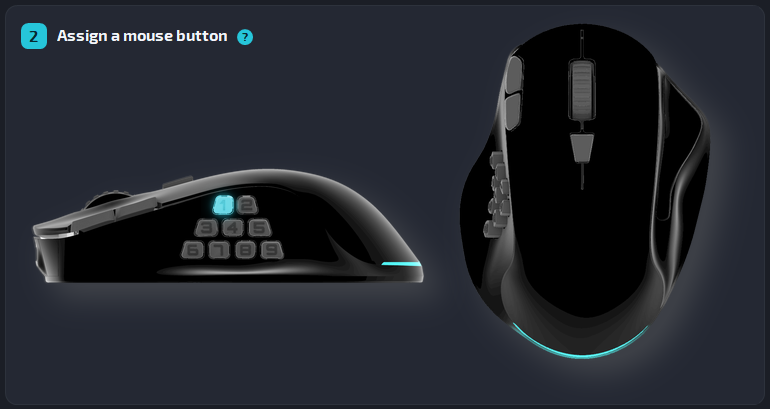
A wired mouse with 9 side buttons, a wheel and 4 extra buttons on top. With KORTLEN Mouse Studio, each one does what you want, in each program.
- Wired, USB-C
- PixArt PAW3395 sensor
- 500–26,000 DPI
- 76 g
€ --,--
incl. VAT, plus shipping
The buttons
Every button can do a new job
- Side buttons 1 to 9 (S1 to S9), under your thumb
- Click, R-Click and Middle
- The wheel: scroll up and scroll down
- The extra buttons on top
A button can act when you press it, when you let it go, or after two or three quick presses. So one button can do two or three jobs.
Inside the mouse
It works without the app too
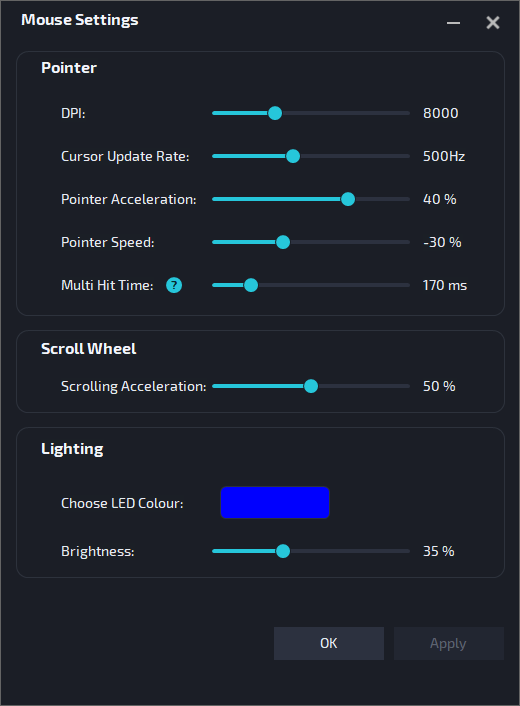
The mouse keeps a lot inside itself. On another computer, or when the app is closed, it still works for all programs:
- The pointer, Click, R-Click, Middle and the wheel work as on a normal mouse.
- Your DPI, speed, scrolling and light stay the same.
- Your buttons for all programs keep their jobs.
Technical data
| Buttons | 9 side buttons, Click, R-Click, Middle, scroll wheel, 4 extra buttons on top |
|---|---|
| Sensor | PixArt PAW3395, optical |
| DPI | 500 to 26,000, set in the app |
| Report rate | 100 to 1,000 Hz, set in the app |
| Light | LED, colour and brightness set in the app |
| Memory | Settings and button jobs for all programs are saved in the mouse |
| Connection | Wired (not wireless). USB-C port on the mouse, removable cable. Fits USB-A and USB-C ports on the computer |
| Size | 120 × 90 × 36 mm (length × width × height) |
| Weight | 76 g |
| Shape | Ergonomic, for the right hand |
| System | The app: Windows 10 and 11, macOS 11 or later. On a computer without the app, the mouse works as a normal USB mouse. |
In the box
- KORTLEN mouse
- USB-C to USB-A cable, 2 m
- 4 spare mouse feet (skates)
- Quick start guide
Wired, with the cable you choose
The KORTLEN mouse is a wired mouse: no battery to charge, no pairing. The cable plugs into a USB-C port on the mouse.
Use the 2 m USB-C to USB-A cable from the box, or any other USB-C cable that carries data (not a charge-only cable): shorter, longer, or with USB-C on both ends for a computer with USB-C ports.
Product safety
Information under the EU General Product Safety Regulation (GPSR).
| Manufacturer | KORTLEN, owner Saleh Habibian Am Girrenbach 10, 87534 Oberstaufen, Germany info@kortlen.com |
|---|---|
| Product | KORTLEN Mouse, model MS-A1-13C1 |
| WEEE reg. no. | DE 61163629 |
Safety information
Intended use
An input device (pointer, buttons, number keys) for normal computers, connected by USB. For homes, offices and businesses, on a flat surface indoors.
Keep the mouse and its accessories, also the spare feet, away from children under 3 years. The feet and the scroll ring can come off and be swallowed.
Lay the cable so that small children cannot reach it. Risk of strangulation.
Keep the plastic bag and the other packaging away from children. Risk of suffocation.
- Do not pull or carry the mouse by the cable. To unplug it, hold the plug.
- Do not open the mouse. There are no parts inside that you can service.
- Clean it only with a slightly damp cloth. Do not put it into liquid, and do not use solvents.
- Use the mouse at 5 °C to 40 °C. Store and transport it at −10 °C to 50 °C. Do not leave it in strong sunlight or heat for a long time, and never in a parked car.
- When you use the mouse for a long time, take regular breaks. If your hand, wrist or arm hurts, stop and ask a doctor.
- The mouse is for dry rooms indoors. Do not use it outdoors or where there is a risk of explosion. It is not for safety-related uses.
Get your KORTLEN mouse
Order it from us by email.